Introduction
ROS 2 organizes functions such as sensing, planning, and control into cooperating nodes, and provides a foundation for communication, scheduling, and system integration. Understanding how nodes exchange data, and what the client, executor, and middleware are each responsible for, is the starting point for reading this architectural guide.
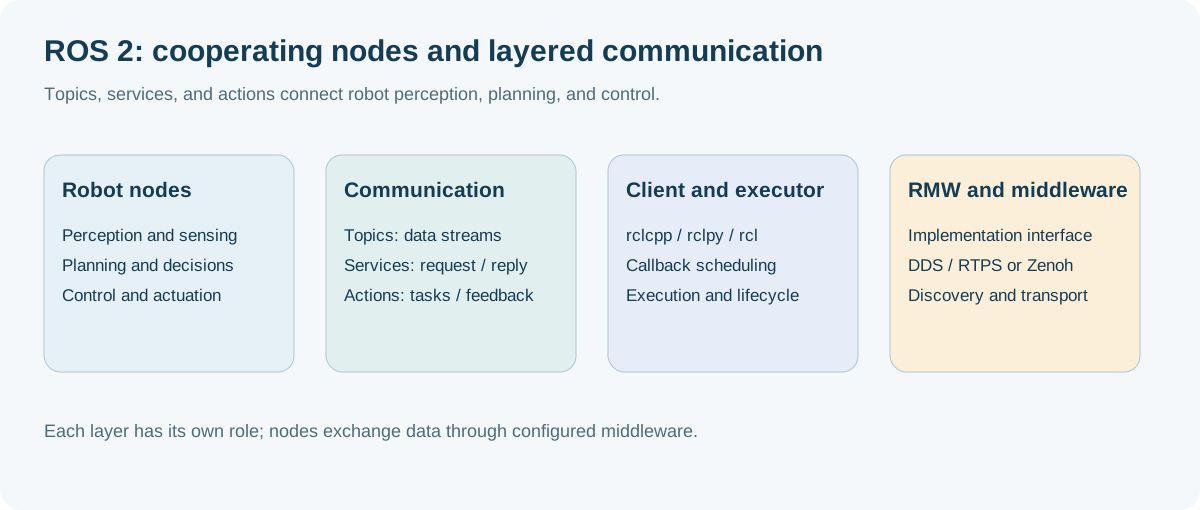
1. From ROS 1 to ROS 2: Paradigm Shift and Design Philosophy
1.1 The evolution history of robot middleware: Why must it be completely reconstructed?
ROS (Robot Operating System) was born in 2007 between the Stanford University Artificial Intelligence Laboratory (STAIR project) and Willow Garage. Its original intention was to provide an open source robot software rapid prototyping platform for the academic community. As robotics technology moves from the laboratory to industrial automation, commercial services, autonomous driving, and humanoid embodied intelligence, the design limitations of ROS 1 have become increasingly prominent:
- Centralized single point of failure (Single Point of Failure): ROS 1 strong dependency
roscore(Master node) running on fixed IP/port. If the Master crashes or a network partition occurs, the node discovery and communication registration of the entire robot system will be completely paralyzed. - lacks determinism and hard/soft real-time support: The bottom layer of ROS 1 is based on standard TCP/UDP sockets. The operating system has no priority control for scheduling and cannot meet the microsecond/millisecond level deterministic real-time control requirements of industrial controllers and underlying motor drivers.
- Poor network adaptability and no native encryption security mechanism: TCPROS/UDPROS has a high packet loss rate and fragile reconnection mechanism in wireless lossy networks (Wi-Fi, 4G/5G, cross-segment); the communication link is plain text transmission, and there is no identity authentication and access control mechanism.
- Multi-machine collaboration and multi-robot clusters are highly complex: ROS 1 multi-machine communication requires strict configuration
ROS_MASTER_URIandROS_IP, and lacks flexible domain isolation and multi-machine discovery management solutions. - embedded microcontroller isolation: cannot run directly on microcontrollers (MCU/DSP/RTOS) with limited computing and memory, and can usually only be inefficiently bridged through fragile serial port protocols (such as
rosserial).
In order to completely solve the above-mentioned industrial-level implementation bottleneck, the Open Robotics decided not to carry out simple patch iterations, but redesigned ROS 2 based on the international industrial standard DDS (Data Distribution Service).
flowchart TB
    subgraph ROS1["ROS 1 Architecture (centralized / fragile connection)"]
        direction TB
        Master["roscore / Master<br/>(XML-RPC Centralized registration / single point bottleneck)"]
        N1["node A (sensor)"] -->|"Register/Query"| Master
        N2["node B (algorithm)"] -->|"Register/Query"| Master
        N3["node C (controller)"] -->|"Register/Query"| Master
        N1 -.->|"peer to peer TCPROS/UDPROS (no QoS guarantee)"| N2
        N2 -.->|"peer to peer TCPROS"| N3
        style Master fill:#ff6b6b,stroke:#c92a2a,color:#fff
    end

    subgraph ROS2["ROS 2 Architecture (decentralized / DDS data bus)"]
        direction TB
        subgraph Bus["DDS global data space (Global Data Space)"]
            P1["node A (Sensor)"]
            P2["node B (Algorithm)"]
            P3["node C (Controller)"]
            P1 <==>|"RTPS Dynamic self-discovery (SPDP/SEDP)"| P2
            P2 <==>|"Industrial grade QoS (real time/reliable/durable)"| P3
            P1 <==>|"zero-copy intra-process communication (IPC / SHM)"| P3
        end
        style Bus fill:#eefaf0,stroke:#51cf66,stroke-width:2px
        style P1 fill:#51cf66,stroke:#2b8a3e,color:#fff
        style P2 fill:#51cf66,stroke:#2b8a3e,color:#fff
        style P3 fill:#51cf66,stroke:#2b8a3e,color:#fff
    end
1.2 ROS 1 vs. ROS 2 full-dimensional core comparison
| Dimensions | ROS 1 (Noetic / Melodic) | ROS 2 (Humble / Iron / Jazzy) | Core Values/Industrial Impact |
|---|---|---|---|
| Network topology | Centralized coordination based on Master (roscore) |
Fully distributed decentralization based on DDS RTPS | Eliminate single points of failure and support large-scale cluster dynamic networking |
| Underlying communication | Custom TCPROS / UDPROS protocol | OMG industrial grade DDS standard (Fast DDS, Cyclone DDS, Connext, etc.) | Reuse military/aerospace grade mature data distribution base |
| Quality of Service (QoS) | Only supports simple TCP reliable transmission and UDP best-effort transmission | Complete QoS policy (Reliability, Durability, History, Deadline, etc.) | Precisely adapts to the requirements of high-frequency, low-latency sensors and high-reliability control |
| Cross-process/intra-process communication | Socket serialization copy; Nodelet intra-process sharing (API split) | Unified Component container; native support for borrowing pointers zero-copy (Zero-Copy IPC) | Greatly reduces the CPU usage of hundreds-of-megabytes high-resolution point-cloud and 4K image transmission |
| node lifecycle | Stateless black box; nodes are initialized out of order. | Native managed lifecycle node (Lifecycle Managed Nodes) | Ensure deterministic controlled startup sequence and fault degradation of sensor drivers, algorithms, and executors |
| real-time support | Linux general-purpose kernel; no real-time guarantees | Support hard real-time OS such as Linux PREEMPT_RT, QNX, VxWorks, etc., with zero memory dynamic allocation API | Meet microsecond-level closed-loop motion control requirements |
| embedded support | Only through rosserial serial port translation |
micro-ROS natively supports STM32, ESP32, Zephyr, and FreeRTOS | MCU microcontroller seamlessly acts as a first-class ROS 2 node |
| Safety mechanism | No security verification, naked network | SROS2 Specification: DDS-Security Authentication, Access Control List (ACL), TLS/AES Encryption | Meet commercial robot security compliance and cyber attack resistance standards |
| parameter system | Globally unified Parameter Server | Node is a private and independent Parameter instance that supports runtime strong type constraints and event monitoring. | Avoid parameter namespace pollution and support dynamic reconfiguration interception |
| Multi-platform build | Strong dependency Ubuntu Linux / CMake (catkin) |
Native support for Linux, Windows, macOS (colcon + ament) |
Lowering the threshold for cross-platform industrial software migration |
1.3 ROS 2 distribution evolution route and lifecycle
ROS 2 adopts a fixed release cycle in collaboration with Ubuntu: a long-term support version (LTS, support period 5 years) is released in May of even-numbered years, and a standard support version is released in May of odd-numbered years (support period 1 year).
timeline
    title ROS 2 Key version evolution timeline
    2020-05 : Foxy Fitzroy (Ubuntu 20.04 LTS / Already EOL)
    2021-05 : Galactic Geochelone (Transitional version / Already EOL)
    2022-05 : Humble Hawksbill (Ubuntu 22.04 LTS / The most widely stable version in the industry)
    2023-05 : Iron Irwini (introduce EventsExecutor / Already EOL)
    2024-05 : Jazzy Jalisco (Ubuntu 24.04 LTS / Latest mainstream LTS at the source baseline)
    2025-05 : Kilted Kaiju (Python 3.12 / modernization C++20 Enhance)
    2026-05 : L-Turtle (next generation core LTS Distro)
Selection Suggestions:
- Production/industrial grade deployment: Preferred ROS 2 Humble (Ubuntu 22.04) or ROS 2 Jazzy (Ubuntu 24.04), the ecosystem package (Nav2, MoveIt 2, ros2_control) has the most complete support.
- cutting-edge algorithm research and development: Choose Jazzy Jalisco or Rolling Ridley to get the latest executor performance optimization and Type Adaptation hardware acceleration features.
2. ROS 2 layered software stack and DDS middleware base
2.1 Analysis of software layered architecture
ROS 2 adopts an extremely clear modular layered design to completely decouple the upper-layer application algorithm from the underlying transmission middleware.
flowchart TB
    subgraph UserLayer["User application layer (User Application Layer)"]
        AppCpp["C++ robot node / components"]
        AppPy["Python algorithm / tool script"]
        AppRust["Rust High reliability and security node"]
    end

    subgraph ClientLayer["client library layer (ROS Client Libraries - RCL)"]
        RCLCPP["rclcpp (Modern C++17/20 interface)"]
        RCLPY["rclpy (Python C-Extension interface)"]
        RCLC["rclc (C interface / Embedded micro-ROS)"]
        RCL["rcl (ROS Client Library pure C core library)"]
        RCUTILS["rcutils / rmw_implementation"]
    end

    subgraph RMWLayer["middleware abstract interface layer (ROS Middleware Interface - RMW)"]
        RMW_API["rmw C Common abstract interface specification<br/>(Create Publisher/Subscriber/Service/WaitSet)"]
    end

    subgraph DDSLayer["DDS supplier implementation layer (DDS Implementations)"]
        RMW_Fast["rmw_fastrtps_cpp<br/>(eProsima Fast DDS)"]
        RMW_Cyclone["rmw_cyclonedds_cpp<br/>(Eclipse Cyclone DDS)"]
        RMW_Connext["rmw_connextdds<br/>(RTI Connext DDS commercial grade)"]
        RMW_Zenoh["rmw_zenoh_cpp<br/>(The next generation of minimalist and high-performance middleware)"]
    end

    subgraph TransportLayer["Transport and hardware layer (Transport & Hardware)"]
        UDP["UDP / IPv4 / IPv6 (LAN multicast / Unicast)"]
        SHM["Shared Memory (POSIX / Iceoryx zero-copy shared memory)"]
        UART["UART / CAN / USB (Serial communication)"]
    end

    AppCpp --> RCLCPP
    AppPy --> RCLPY
    AppRust --> RCL
    RCLCPP --> RCL
    RCLPY --> RCL
    RCLC --> RCL
    RCL --> RCUTILS --> RMW_API
    RMW_API --> RMW_Fast
    RMW_API --> RMW_Cyclone
    RMW_API --> RMW_Connext
    RMW_API --> RMW_Zenoh
    RMW_Fast --> UDP & SHM
    RMW_Cyclone --> UDP & SHM
    RMW_Connext --> UDP & SHM
    RMW_Zenoh --> UDP & UART
Key component responsibilities:
rcl(ROS Client Library): A common logic layer written in pure C language, which implements language-independent core functions such as parameter analysis, node graph topology, log system, clock management, etc., ensuring that the behavior of multi-language clients such as C++ and Python is strictly consistent.rmw(ROS Middleware): A unified C interface specification that defines interfaces such as publishing, subscription, waiting set, QoS mapping, etc. The upper layer is completely unaware of the specific DDS used by the lower layer.rosidl: Interface Definition Language (IDL) generator, which automatically generates.msg,.srv, and.actioninto native structures and serialization/deserialization codes in C, C++, and Python.
2.2 DDS (Data Distribution Service) core working mechanism
DDS is the Object Management Organization ( OMG ), the core of which is Data-Centric Publish-Subscribe Model (DCPS, Data-Centric Publish-Subscribe) .
flowchart LR
    subgraph Domain["DDS communication domain (Domain ID: 0~101)"]
        subgraph Participant1["DomainParticipant (Node 1)"]
            Pub["Publisher"] --> DW["DataWriter"]
        end

        subgraph GlobalDataSpace["global data space (Global Data Space)"]
            TopicData[("Topic: /camera/image_raw<br/>Type: sensor_msgs/Image<br/>QoS: SensorData Profile")]
        end

        subgraph Participant2["DomainParticipant (Node 2)"]
            DR["DataReader"] --> Sub["Subscriber"]
        end

        DW ==>|"write (Write)"| TopicData
        TopicData ==>|"read (Take/Read)"| DR
    end
RTPS dynamic self-discovery protocol (Discovery Protocol)
When DDS nodes are started in the LAN, they can automatically discover each other without Master coordination. It contains two Stages:
- SPDP (Simple Participant Discovery Protocol): After the node starts, it periodically sends multicast heartbeat packets to the predetermined port (the multicast address
239.255.0.1calculated based on the Domain ID) to announce its Participant GUID, IP address and transmission port. - SEDP (Simple Endpoint Discovery Protocol): When Participants discover each other, they establish a reliable unicast connection and exchange the DataWriter / DataReader details (Topic name, data type, QoS configuration) contained in each other. If the QoS matching is successful, a point-to-point data channel is established at the bottom layer.
sequenceDiagram
    autonumber
    participant A as node A (Publisher)
    participant Multicast as LAN multicast network segment (SPDP)
    participant B as node B (Subscriber)

    Note over A: node A start (Domain 0)
    A->>Multicast: broadcast SPDP heartbeat: "i am NodeA, IP:Port=..."
    Multicast->>B: forward SPDP discovery message
    Note over B: node B record NodeA exist
    B->>A: unicast reply SPDP heartbeat: "i am NodeB, IP:Port=..."

    rect rgb(240, 248, 255)
        Note over A,B: enter SEDP endpoint matching phase (Unicast exchange metadata)
        A->>B: SEDP declare: "i have DataWriter, topic: /scan, QoS: BestEffort"
        B->>A: SEDP declare: "i have DataReader, topic: /scan, QoS: BestEffort"
        Note over A,B: Check QoS Compatibility: Match successful!
    end

    rect rgb(240, 255, 240)
        Note over A,B: Establish a direct data flow channel
        loop Sensor data cycle transmission
            A->>B: Send lidar PointCloud / LaserScan packet
        end
    end
2.3 Comparison and quick switching of mainstream RMW middleware
| middleware (RMW) | Supplier/Licensing | Advantages and core features | Disadvantages/Notes | Recommended application scenarios |
|---|---|---|---|---|
Fast DDS (rmw_fastrtps_cpp) |
eProsima (Apache-2.0) | ROS 2 official default implementation; complete functions, built-in high-performance shared memory (SHM) transmission, and supports Discovery Server | Multicast packet loss in a weak Wi-Fi network environment can easily lead to slow discovery | Default general robot development, stand-alone simulation, high-performance stand-alone deployment |
Cyclone DDS (rmw_cyclonedds_cpp) |
Eclipse (EPL-2.0) | The architecture is lightweight and the code is refined; it is extremely robust to Wi-Fi jitter networks, has high throughput and extremely low latency. | Shared memory configuration is more complex (requires Iceoryx) | Autonomous driving, multi-machine distributed systems, wireless mobile robots |
Connext DDS (rmw_connextdds) |
RTI (commercial license) | Industrial/military grade certification, support for safety-critical systems (ISO 26262 ASIL-D, DO-178C), complete debugging toolset | Commercial charging closed source | Aerospace, medical surgical robots, automotive grade autonomous driving systems |
Zenoh (rmw_zenoh_cpp) |
ZettaScale (Apache-2.0) | Abandon complex RTPS and adopt a minimalist protocol; zero multicast storm, naturally supporting cross-public network/4G/5G/cloud-edge collaborative communication | Still evolving rapidly, the ecosystem tool chain is gradually maturing. | Cross-wide area network (WAN) vehicle-cloud interconnection and large-scale robot cluster management |
# Dynamic switching of environment variables RMW(No need to recompile code)
export RMW_IMPLEMENTATION=rmw_cyclonedds_cpp
ros2 run my_pkg my_node

# Verify currently using RMW realize
ros2 doctor --report | grep middleware
2.4 Multi-machine communication and Domain ID isolation
In order to isolate nodes of different robots or teams under the same LAN switch, ROS 2 introduced ROS_DOMAIN_ID (range 0 ~ 101, security recommended range 0 ~ 232).
# In ~/.bashrc Configure the robot's unique domain in ID
export ROS_DOMAIN_ID=42
export ROS_LOCALHOST_ONLY=0 # 0 Indicates that multi-machine communication on the LAN is allowed.1 Indicates only local loopback
DDS Port calculation underlying formula: Each Domain ID occupies a fixed range of UDP ports: \(\text{Port} = 7400 + 250 \times \text{DomainID} + \text{Offset}\) If multiple devices in the same network segment are set with the same
ROS_DOMAIN_ID, their nodes will automatically communicate with each other.
3. In-depth analysis and code practice of the five major communication primitives of ROS 2
ROS 2 abstracts all software decoupled interactions into five communication primitives. Choosing the correct communication method is the first principle of system architecture design.
mindmap
  root((ROS 2 communication primitives))
    Topics
      One-way asynchronous broadcast
      publish / Subscription model
      Applicable: high-frequency sensor flow, control instructions
    Services
      Synchronous / asynchronous request-response
      client / server mode
      Applicable: short-term triggering, mode switching, parameter query
    Actions
      Preemptive long-running asynchronous tasks
      contains Goal / Feedback / Result
      Applicable to: Navigation, robotic arm trajectory execution
    Parameters
      node private runtime configuration
      Support dynamic changes and verification
      Applicable:PID Gain, threshold, sensor extrinsics
    Lifecycle
      Controlled state transitions
      Unconfigured -> Inactive -> Active
      Applicable: deterministic drive startup, fault protection
3.1 Five primitive selection decision matrix
flowchart TD
    Start([Need inter-module communication?]) --> Q1{Continuous or high-frequency data?}
    Q1 -->|"Yes"| NodeTopic["Use topic (Topic)<br/>Publish-subscribe / asynchronous decoupling"]
    Q1 -->|"No"| Q2{Need a response from the peer?}
    Q2 -->|"No"| NodeTopic
    Q2 -->|"Yes"| Q3{Does the task take more than 100ms?}
    Q3 -->|"No: short operation"| NodeService["Use service (Service)<br/>Request-response / short operation"]
    Q3 -->|"Yes: long or cancellable task"| NodeAction["Use action (Action)<br/>Progress feedback / cancellation support"]
    Start --> Q4{Algorithm configuration or runtime parameter change?}
    Q4 -->|"Yes"| NodeParam["Use parameters (Parameter)<br/>YAML configuration / validation callbacks"]
3.2 Topic (Topics): Asynchronous high-frequency data flow
Communication principles
topic is a many-to-many publish-subscribe (Pub/Sub) channel. The publisher pushes the data to the DDS domain, and the subscriber receives the data according to the QoS policy. The two parties are completely decoupled in lifecycle and network topology.
flowchart LR
    subgraph Publishers["publisher cluster"]
        P1["Lidar driver"]
        P2["Depth camera point cloud"]
        P3["Wheel odometry driver"]
    end

    subgraph Channel["DDS topic bus"]
        T1(["/scan\n(sensor_msgs/LaserScan)"])
        T2(["/odom\n(nav_msgs/Odometry)"])
    end

    subgraph Subscribers["subscriber cluster"]
        S1["SLAM Map node"]
        S2["local obstacle avoidance algorithm"]
        S3["RViz2 visualization"]
    end

    P1 --> T1
    P2 --> T1
    P3 --> T2
    T1 --> S1 & S2 & S3
    T2 --> S1 & S2
C++17 industrial-grade implementation (rclcpp)
#include <chrono>
#include <memory>
#include <string>
#include "rclcpp/rclcpp.hpp"
#include "std_msgs/msg/string.hpp"

using namespace std::chrono_literals;

class RobustPublisher : public rclcpp::Node {
public:
    RobustPublisher() : Node("robust_publisher_node"), count_(0) {
        // Create sensor-specific BestEffort QoS
        rclcpp::QoS qos_profile(rclcpp::KeepLast(10));
        qos_profile.best_effort();
        qos_profile.durability_volatile();

        publisher_ = this->create_publisher<std_msgs::msg::String>("/telemetry_data", qos_profile);
        timer_ = this->create_wall_timer(100ms, std::bind(&RobustPublisher::timer_callback, this));

        RCLCPP_INFO(this->get_logger(), "High-frequency publisher node has been started (10Hz)...");
    }

private:
    void timer_callback() {
        auto message = std_msgs::msg::String();
        message.data = "Telemetry Frame #" + std::to_string(count_++);
        publisher_->publish(message);
    }

    rclcpp::TimerBase::SharedPtr timer_;
    rclcpp::Publisher<std_msgs::msg::String>::SharedPtr publisher_;
    size_t count_;
};

int main(int argc, char* argv[]) {
    rclcpp::init(argc, argv);
    rclcpp::spin(std::make_shared<RobustPublisher>());
    rclcpp::shutdown();
    return 0;
}
Python implementation (rclpy)
#!/usr/bin/env python3
import rclpy
from rclpy.node import Node
from rclpy.qos import QoSProfile, ReliabilityPolicy, HistoryPolicy
from std_msgs.msg import String

class RobustSubscriber(Node):
    def __init__(self):
        super().__init__('robust_subscriber_node')

        # Definition matching publisher QoS Configuration
        qos = QoSProfile(
            history=HistoryPolicy.KEEP_LAST,
            depth=10,
            reliability=ReliabilityPolicy.BEST_EFFORT
        )

        self.subscription = self.create_subscription(
            String,
            '/telemetry_data',
            self.listener_callback,
            qos
        )
        self.get_logger().info('The subscribing node is ready, waiting for telemetry data...')

    def listener_callback(self, msg: String):
        self.get_logger().info(f'telemetry frame received: "{msg.data}"')

def main(args=None):
    rclpy.init(args=args)
    node = RobustSubscriber()
    try:
        rclpy.spin(node)
    except KeyboardInterrupt:
        pass
    finally:
        node.destroy_node()
        rclpy.shutdown()

if __name__ == '__main__':
    main()
3.3 Services: synchronous/asynchronous request-response
Communication principles
The service is a point-to-point client-server (Client/Server) communication model. The client sends Request, and the server returns Response after calculation.
Key avoidance pit: In ROS 2, is strictly prohibited from calling synchronous blocking services (such as
client->call()) in the callback function of the default single-threaded Executor, which will cause thread deadlock (Deadlock)! It is recommended to always use the asynchronous clientcall_async().
sequenceDiagram
    autonumber
    participant C as Service Client (control node)
    participant S as Service Server (Motor servo drive)

    C->>S: send SetBool.Request {data: true}
    Note over C: non-blocking wait (async) / Register Future callback
    Note over S: Execute enable power-on logic...
    S-->>C: Return SetBool.Response {success: true, message: "Motor Ready"}
    Note over C: Future Completed, perform subsequent business
3.4 Actions: Preemptive long-term task scheduling
Communication principles
Actions are designed for long-term asynchronous tasks (such as chassis navigation to move from point A to point B, robotic arm performing a grab). An Action is composed of 3 underlying communication channels:
- Goal channel (Service): The client sends a goal request, and the server decides to accept (Accept) or reject (Reject).
- Feedback channel (Topic): During the execution of the task, the server continues to push progress data such as percentage and current pose to the client.
- Result channel (Service): When the task ends, the final execution result (success/failure/preempted) is returned.
- Cancellation channel (Service): The client can initiate a cancellation request at any time, and the server can safely interrupt the current action.
stateDiagram-v2
    [*] --> ACCEPTED: client sends Goal, server accepts
    ACCEPTED --> EXECUTING: Start executing task logic

    state EXECUTING {
        [*] --> PublishingFeedback: Keep sending Feedback topic
        PublishingFeedback --> PublishingFeedback: Compute intermediate states
    }

    EXECUTING --> SUCCEEDED: Complete your goals successfully (succeed)
    EXECUTING --> ABORTED: Encountered an unrecoverable exception (abort)
    EXECUTING --> CANCELING: Receive client CancelGoal Request

    CANCELING --> CANCELED: Safely stop an executor (canceled)

    SUCCEEDED --> [*]
    ABORTED --> [*]
    CANCELED --> [*]
Action interface definition (nav2_msgs/action/NavigateToPose.action)
# 1. Target (Goal)
geometry_msgs/PoseStamped pose
string behavior_tree
---
# 2. Final result (Result)
std_msgs/Empty result
int16 error_code
---
# 3. Real time feedback (Feedback)
geometry_msgs/PoseStamped current_pose
builtin_interfaces/Duration navigation_time
builtin_interfaces/Duration estimated_time_remaining
int16 number_of_recoveries
float32 distance_remaining
3.5 Parameters: distributed node-level configuration
In ROS 2, parameters are private data items bound to a specific node instance, supporting strong type verification, range constraints and dynamic modification callback interception.
// C++ Declare parameters with descriptors and dynamic verification
rcl_interfaces::msg::ParameterDescriptor desc;
desc.description = "Robot maximum linear speed limit (m/s)";
desc.floating_point_range.resize(1);
desc.floating_point_range[0].from_value = 0.0;
desc.floating_point_range[0].to_value = 2.5;
desc.floating_point_range[0].step = 0.05;
this->declare_parameter("max_linear_velocity", 1.0, desc);
// Register dynamic parameter change interception callback (OnSetParametersCallback)
params_callback_handle_ = this->add_on_set_parameters_callback(
[this](const std::vector<rclcpp::Parameter> ¶meters) {
rcl_interfaces::msg::SetParametersResult result;
result.successful = true;
for (const auto ¶m : parameters) {
if (param.get_name() == "max_linear_velocity") {
if (param.as_double() > 2.0) {
result.successful = false;
result.reason = "Safety protection trigger: the actual vehicle line speed cannot exceed 2.0 m/s";
} else {
RCLCPP_INFO(this->get_logger(), "The speed cap is updated to: %.2f", param.as_double());
}
}
}
return result;
}
);
4. Quality of Service Strategy (QoS): Refined Communication Control
QoS (Quality of Service) is the most powerful communication feature that distinguishes ROS 2 from ROS 1, allowing the underlying transmission behavior to be accurately configured for different data flow characteristics.
4.1 In-depth analysis of core QoS policies
flowchart TB
    subgraph QoSPolicies["ROS 2 core QoS Dimensions"]
        direction TB
        R["Reliability (Reliability)<br/>• RELIABLE (TCP packet loss retransmission)<br/>• BEST_EFFORT (UDP best effort)"]
        D["Durability (persistence)<br/>• VOLATILE (Do not cache history)<br/>• TRANSIENT_LOCAL (Cache the latest N samples for late-joining nodes)"]
        H["History & Depth (history queue)<br/>• KEEP_LAST (keep the latest N samples)<br/>• KEEP_ALL (Keep all until memory is exhausted)"]
        L["Liveliness & Lease (Activity Keep Alive)<br/>• AUTOMATIC (Automatically report heartbeat)<br/>• MANUAL_BY_TOPIC (Determine disconnection based on publishing frequency)"]
        DL["Deadline & Lifespan (Time constraints)<br/>• Deadline (New data must arrive within the specified time)<br/>• Lifespan (Data packet valid lifetime, automatically discarded after expiration)"]
    end
4.2 QoS Compatibility Matching Rules (Compatibility Rules)
⚠️ Industrial grade pit avoidance guidelines: Request vs. Offer principle The QoS service quality offered by the publisher must be greater than or equal to the QoS quality requested by the subscriber. Otherwise, the DDS layer will silently refuse to establish the connection, resulting in the inability to receive data without any error message!
flowchart LR
    subgraph Publisher["Publishing side (Offered QoS)"]
        PubRel["Reliability: BEST_EFFORT"]
    end

    subgraph Subscriber["Subscriber (Requested QoS)"]
        SubRel["Reliability: RELIABLE"]
    end

    Publisher -.->|"❌ Match failed! Silent disconnect"| Subscriber

    style Publisher fill:#ffe3e3,stroke:#e03131
    style Subscriber fill:#ffe3e3,stroke:#e03131
Core compatibility matrix:
| publisher (Offered) | subscriber (Requested) | Match results | Description |
|---|---|---|---|
| RELIABLE | RELIABLE | ✅ Compatible | Reliable transmission across the entire link (automatic retransmission of lost packets) |
| RELIABLE | BEST_EFFORT | ✅ Compatible | The publisher can provide high guarantee, and the subscriber accepts a weaker guarantee |
| BEST_EFFORT | BEST_EFFORT | ✅ Compatible | Best effort transmission, low latency, packet loss allowed |
| BEST_EFFORT | RELIABLE | ❌ Incompatible | The subscriber requires reliability, but the publisher cannot guarantee it. cannot communicate |
| TRANSIENT_LOCAL | VOLATILE | ✅ Compatible | The subscriber does not require historical data and can receive real-time data normally. |
| VOLATILE | TRANSIENT_LOCAL | ❌ Incompatible | Subscriber requires historical map, but publisher is not cached, cannot communicate |
4.3 Typical scenario standard QoS configuration template
| Scenario application | Reliability | Durability | History (Depth) | design considerations |
|---|---|---|---|---|
high frequency raw camera image / lidar (/image_raw, /scan) |
BEST_EFFORT |
VOLATILE |
KEEP_LAST (1~5) |
Pursuing extremely low latency, discarding an old image has no impact and avoids queue backlog |
Chassis control command (/cmd_vel) |
RELIABLE |
VOLATILE |
KEEP_LAST (10) |
Control instructions must be delivered accurately, and frame loss causing loss of control is prohibited. |
static map / parameter event (/map, /robot_description) |
RELIABLE |
TRANSIENT_LOCAL |
KEEP_LAST (1) |
Similar to the Latch mechanism of ROS 1, the SLAM/Nav2 node started later can obtain the full map as soon as it goes online. |
high reliability status alarm (/emergency_stop) |
RELIABLE |
TRANSIENT_LOCAL |
KEEP_ALL |
Emergency stop and failure events must never be lost |
5. Executor, callback group and zero-copy IPC mechanism
5.1 ROS 2 executor (Executors) scheduling model
In ROS 2, callback functions (Timer, Subscription, Service Server, Action) are not automatically executed in background threads. Instead, Executor (executor) polls the ready event from the underlying WaitSet and schedules execution.
flowchart TB
    subgraph SingleThread["SingleThreadedExecutor (Single thread sequential execution)"]
        direction TB
        Q1["ready queue: [Timer] -> [Sub1] -> [Service]"]
        T1["Single Worker thread"]
        Q1 --> T1
        note1["Advantages: No concurrency contention, natural thread safety<br/>Disadvantage: Any time-consuming callback will block all subsequent events"]
    end

    subgraph MultiThread["MultiThreadedExecutor (Thread pool parallel scheduling)"]
        direction TB
        Q2["Unified ready queue"]
        subgraph Pool["Worker thread pool (Such as 4 thread)"]
            W1["Thread 1"]
            W2["Thread 2"]
            W3["Thread 3"]
            W4["Thread 4"]
        end
        Q2 --> Pool
        note2["Pros: Take advantage of multiple cores CPU, Improve response throughput<br/>Requirements: Must be properly configured CallbackGroup Prevent data races"]
    end

    subgraph EventsExec["EventsExecutor (Jazzy/Rolling event driven scheduling)"]
        direction TB
        Evt["No polling Waitset<br/>Directly via lightweight semaphore DDS event driven wake up"]
        note3["extremely low CPU Idling overhead greatly reduces power consumption at low load"]
    end
5.2 Callback group (Callback Groups) and deadlock prevention
In order to finely control concurrent permissions in MultiThreadedExecutor, ROS 2 provides two types of callback groups:
MutuallyExclusiveCallbackGroup(mutually exclusive group, default): All callback functions in this group can only be executed by one thread at the same time.ReentrantCallbackGroup(reentrant group): Different callbacks within the group (even multiple triggers of the same callback) can be executed in parallel by multiple threads.
flowchart LR
    subgraph NodeInstance["node internal structure"]
        subgraph Group1["MutuallyExclusive Group (mutually exclusive group)"]
            CB1["Sensor status polling Timer (100Hz)"]
            CB2["Motor enable Service"]
        end

        subgraph Group2["Reentrant Group (reentrant group)"]
            CB3["High frequency image processing subscriber"]
            CB4["point cloud filter subscriber"]
        end
    end

    Pool["MultiThreadedExecutor thread pool"]
    Pool -.-> Group1
    Pool ==> Group2
Classic deadlock scenario and solution: If a subscriber callback is synchronously waiting for another service response, and both belong to the default
MutuallyExclusiveCallbackGroupand run under a single-threaded Executor, the subscriber occupies the thread to wait for the service, and the service can never be executed because it cannot obtain the thread, forming a permanent deadlock. solution:
- Assign the service and subscriber to different
CallbackGroup.- Mount node under
MultiThreadedExecutor.- Use non-blocking
call_async()instead.
5.3 Components and intra-process zero-copy communication (IPC)
Traditional multi-node systems adopt a multi-process model, and data transfer between nodes requires: user-mode memory $\to$ serialization $\to$ kernel Socket $\to$ deserialization $\to$ target user-mode memory, in 4K Image or 3D laser point cloud scenarios (hundreds of megabytes per second) result in extremely high CPU and memory bandwidth overhead.
ROS 2’s Component (component) technology allows multiple independently developed Nodes to be compiled into dynamic link libraries (.so / .dll) and dynamically loaded into the same ComposableNodeContainer process at runtime. Together with std::unique_ptr, this enables zero-copy IPC by transferring pointer ownership.
flowchart TB
    subgraph Traditional["Traditional cross-process communication (IPC with Serialization)"]
        P1["node A (Camera Driver)"] -->|"1. serialized data"| K["OS Kernel Socket / DDS"]
        K -->|"2. Cross-process copy + Deserialization"| P2["node B (YOLO Detect)"]
    end

    subgraph ZeroCopy["Component container + Borrow pointer zero-copy (Zero-Copy Transfer)"]
        subgraph Container["ComposableNodeContainer (Single process space)"]
            C1["CameraComponent"]
            C2["DetectComponent"]
            C1 ==>|"pass directly std::unique_ptr pointer<br/>(Latency < 1 microsecond, zero memory copy!)"| C2
        end
    end
C++ zero-copy publisher example
#include "rclcpp/rclcpp.hpp"
#include "sensor_msgs/msg/point_cloud2.hpp"

class ZeroCopyPointCloudPublisher : public rclcpp::Node {
public:
    explicit ZeroCopyPointCloudPublisher(const rclcpp::NodeOptions & options)
    : Node("zero_copy_publisher", options) {
        // Create publisher, must be passed in NodeOptions opened in IPC support
        pub_ = this->create_publisher<sensor_msgs::msg::PointCloud2>("/points", 10);
        timer_ = this->create_wall_timer(33ms, std::bind(&ZeroCopyPointCloudPublisher::publish_cloud, this));
    }

private:
    void publish_cloud() {
        // Use unique_ptr Construct exclusive ownership message
        auto cloud_msg = std::make_unique<sensor_msgs::msg::PointCloud2>();

        // Populate large point cloud data buffer ...
        cloud_msg->header.stamp = this->now();
        cloud_msg->header.frame_id = "lidar_frame";
        cloud_msg->width = 1920;
        cloud_msg->height = 1080;
        cloud_msg->data.resize(cloud_msg->width * cloud_msg->height * 16);

        // Use std::move Transfer ownership, triggering direct exchange of underlying intra-process pointers
        pub_->publish(std::move(cloud_msg));
    }

    rclcpp::Publisher<sensor_msgs::msg::PointCloud2>::SharedPtr pub_;
    rclcpp::TimerBase::SharedPtr timer_;
};
6. Controlled startup: lifecycle nodes
In industrial-grade robot systems, random startup of nodes may cause catastrophic accidents (such as the navigation algorithm issuing speed instructions before the lidar or chassis drive has completed parameter verification and calibration). ROS 2 introduces the ISO-standard Lifecycle Node (lifecycle managed node).
6.1 Lifecycle finite state machine
stateDiagram-v2
    [*] --> Unconfigured: Constructor instantiation

    Unconfigured --> Inactive: on_configure()<br/>(Allocate resources and load YAML, Establish communication)
    Inactive --> Unconfigured: on_cleanup()<br/>(Release large memory, reset hardware)

    Inactive --> Active: on_activate()<br/>(Enable hardware driver and turn on executor output)
    Active --> Inactive: on_deactivate()<br/>(Emergency pause, disable motor output)

    Active --> Finalized: on_shutdown()
    Inactive --> Finalized: on_shutdown()
    Unconfigured --> Finalized: on_shutdown()

    Active --> ErrorProcessing: Catching runtime exceptions
    Inactive --> ErrorProcessing: Configuration verification failed
    Unconfigured --> ErrorProcessing: Hardware connection abnormality

    ErrorProcessing --> Unconfigured: on_error() Processed successfully
    ErrorProcessing --> Finalized: on_error() Processing failed

    Finalized --> [*]: Destruct and destroy node
Core state semantics:
Unconfigured(not configured): The node is loaded, but the parameters are not read and the hardware device is not connected.Inactive(inactive): The configuration is loaded, the Publisher and Subscriber are established, but the Publisher is in a silent state (does not broadcast any messages to DDS), and the execution is suspended.Active(active state): The system is operating normally, all callbacks are activated, and the main control loop is executed.Finalized(terminal status): Resources are completely released and the process is ready to exit.
7. Coordinate transformation engine: TF2 in-depth analysis
There are a large number of geometric coordinate frames in the robot system (world, base, lidar, end-effector, and camera optical frames). TF2 (Transform Library 2) is responsible for maintaining the space-time transformation tree (Transform Tree) within the entire robot lifecycle.
7.1 Robot standard coordinate frame specification (REP 105 & REP 103)
According to the official ROS specification REP 105, mobile robots must strictly follow the tree-like single-parent topology:
flowchart TB
    earth["earth (global earth coordinate frame / ECEF WGS-84)"]
    map["map (Map global coordinate frame / Fixed origin / discrete corrections)"]
    odom["odom (odometry local coordinate frame / Continuous / subject to drift)"]
    base_footprint["base_footprint (Base projection onto the ground / Z=0)"]
    base_link["base_link (Robot body rigid body geometric center)"]

    subgraph Sensors["Sensor extrinsic frames (static TF broadcast)"]
        laser_link["laser_link (lidar)"]
        camera_link["camera_link (camera reference frame)"]
        camera_optical["camera_optical_frame (Optical frame: X right / Y down / Z forward)"]
        imu_link["imu_link (IMU inertial unit)"]
    end

    earth -.->|"GPS / RTK localization broadcast"| map
    map -->|"SLAM / AMCL localization broadcast (Eliminate drift)"| odom
    odom -->|"Wheel / visual odometry broadcasts"| base_footprint
    base_footprint --> base_link
    base_link ==> laser_link
    base_link ==> camera_link
    camera_link ==> camera_optical
    base_link ==> imu_link

    style map fill:#d0ebff,stroke:#1971c2
    style odom fill:#ffe8cc,stroke:#d9480f
    style base_link fill:#d3f9d8,stroke:#2b8a3e
- REP 103 Coordinate axis definition convention:
- Robot body: FLU (Forward-Left-Up): $X$ axis is forward, $Y$ axis is to the left, $Z$ axis is upward.
- Camera optical coordinate frame: RDF (Right-Down-Forward): $X$ axis is to the right, $Y$ axis is downward, and $Z$ axis is forward (sight direction).
7.2 Dynamic TF (/tf) vs static TF (/tf_static)
/tf(dynamic transformation): Broadcast the changing relative pose (such asodom -> base_link) at a fixed frequency (such as 50Hz)./tf_static(static extrinsics): only broadcast once when the system starts or the sensor extrinsic calibration is completed. The bottom layer usesTRANSIENT_LOCALQoS for persistent storage. greatly saves CPU calculation and DDS broadcast bandwidth.
// C++ Monitor and query the transformation relationship between any two coordinate frames at a certain moment in history
#include "tf2_ros/buffer.h"
#include "tf2_ros/transform_listener.h"

auto tf_buffer = std::make_unique<tf2_ros::Buffer>(this->get_clock());
auto tf_listener = std::make_shared<tf2_ros::TransformListener>(*tf_buffer);

try {
    // Most blocked 100ms Query map Arrive laser_link latest transformation of
    geometry_msgs::msg::TransformStamped transform = tf_buffer->lookupTransform(
        "map", "laser_link",
        tf2::TimePointZero,
        std::chrono::milliseconds(100)
    );
    RCLCPP_INFO(this->get_logger(), "Radar global coordinates on the map: x=%.2f, y=%.2f",
                transform.transform.translation.x, transform.transform.translation.y);
} catch (const tf2::TransformException & ex) {
    RCLCPP_WARN(this->get_logger(), "TF Transform query failed: %s", ex.what());
}
8. Robot modeling and description: URDF and Xacro
8.1 Robot description system
- URDF (Unified Robot Description Format): Use XML to describe the robot’s links, joints, physical collision bodies and inertia tensors.
- Xacro (XML Macros): Evolved from the defect that URDF does not support variables, macros, inclusions and mathematical operations, it is the standard way of modeling modern robots.
flowchart LR
    subgraph Modeling["Robot modeling and publishing data flow"]
        XACRO["robot.xacro<br/>(Parametric macros and mathematical expressions)"] -->|"xacro parser"| URDF["robot.urdf (Standard XML)"]
        URDF --> RSP["robot_state_publisher"]
        JSP["joint_state_publisher<br/>or ros2_control<br/>(publish /joint_states)"] --> RSP
        RSP -->|"Broadcast global static and dynamic TF"| TF_Tree["/tf_static & /tf coordinate tree"]
        TF_Tree --> RViz["RViz2 / Nav2 / MoveIt 2"]
    end
8.2 Industrial Xacro parameterized macro example
<?xml version="1.0"?>
<robot xmlns:xacro="http://www.ros.org/wiki/xacro" name="industrial_diff_bot">

  <!-- constant definition -->
  <xacro:property name="wheel_radius" value="0.10" />
  <xacro:property name="wheel_width" value="0.05" />
  <xacro:property name="wheel_mass" value="2.5" />
  <xacro:property name="track_width" value="0.45" />

  <!-- Macro: Parameterized definition of power drive wheels -->
  <xacro:macro name="drive_wheel" params="prefix side_sign">
    <link name="${prefix}_wheel_link">
      <visual>
        <origin xyz="0 0 0" rpy="${pi/2} 0 0"/>
        <geometry>
          <cylinder radius="${wheel_radius}" length="${wheel_width}"/>
        </geometry>
        <material name="black"><color rgba="0.1 0.1 0.1 1.0"/></material>
      </visual>
      <collision>
        <origin xyz="0 0 0" rpy="${pi/2} 0 0"/>
        <geometry>
          <cylinder radius="${wheel_radius}" length="${wheel_width}"/>
        </geometry>
      </collision>
      <inertial>
        <mass value="${wheel_mass}"/>
        <inertia ixx="${(wheel_mass/12.0)*(3*wheel_radius*wheel_radius + wheel_width*wheel_width)}"
                 iyy="${(wheel_mass/12.0)*(3*wheel_radius*wheel_radius + wheel_width*wheel_width)}"
                 izz="${(wheel_mass/2.0)*(wheel_radius*wheel_radius)}"
                 ixy="0.0" ixz="0.0" iyz="0.0"/>
      </inertial>
    </link>

    <joint name="${prefix}_wheel_joint" type="continuous">
      <parent link="base_link"/>
      <child link="${prefix}_wheel_link"/>
      <origin xyz="0 ${side_sign * track_width / 2.0} 0" rpy="0 0 0"/>
      <axis xyz="0 1 0"/>
    </joint>
  </xacro:macro>

  <!-- Instantiate left and right wheels -->
  <xacro:drive_wheel prefix="left" side_sign="1" />
  <xacro:drive_wheel prefix="right" side_sign="-1" />

</robot>
9. ROS 2 modern simulation and digital twin platform
flowchart TD
    subgraph SimPlatforms["Three mainstream simulation infrastructures"]
        direction TB
        GZ["Modern Gazebo (Gazebo Sim / Harmonic)<br/>• Official standard configuration, cross-platform physics simulation<br/>• Bidirectional topic bridging through ros_gz_bridge"]
        Isaac["NVIDIA Isaac Sim / Isaac ROS<br/>• Based on Omniverse Ray Tracing and Realistic Physical Rendering<br/>• support NITROS zero-copy GPU Pass-through and synthetic data generation"]
        Webots["Webots / MuJoCo<br/>• Extremely fast and lightweight physics calculations / Suitable for reinforcement-learning simulation"]
    end

    subgraph ClockSync["Clock Consistency Synchronization Specification (/clock)"]
        SimEngine["The simulation engine publishes a virtual simulation clock (/clock)"] ==>|"use_sim_time: true"| ROS2Nodes["All ROS 2 nodes use simulation time"]
    end
Simulation-time requirement: During simulation running or Rospackage offline data playback, all algorithm nodes must explicitly set the parameter:
use_sim_time: true, otherwise the node will read the real system clock of the host, resulting in a TF extrapolation error (ExtrapolationException) in TF interpolation due to timestamp drift.
10. Core ROS 2 ecosystem stacks
mindmap
  root((ROS 2 ecosystem))
    Autonomous mobile navigation Nav2
      BT.CPP behavior tree engine
      SmacPlanner global search
      MPPI / RPP local control
      Costmap2D layered costmap
    Robotic arm manipulation MoveIt 2
      MoveGroup action planning
      OMPL / CHOMP path generation
      MoveIt Servo real time servo
      FCL Dynamic collision detection
    Hardware control ros2_control
      Controller Manager
      Hardware resource interface HRI
      real time control loop (RT Loop)
    microcontroller micro-ROS
      Micro XRCE-DDS
      FreeRTOS / Zephyr
      MCU Native Publisher/Subscriber
10.1 Nav2 (Navigation 2) autonomous mobile navigation stack
Nav2 is the second generation of autonomous mobile robot navigation system officially built by ROS 2. It reconstructs the overall architecture of ROS 1 navigation and is completely implemented based on behavior tree (BehaviorTree.CPP) and lifecycle manager (LifecycleManager).
flowchart TB
    subgraph Nav2_Architecture["Nav2 Core architecture panorama"]
        direction TB
        BT_Nav["Behavior Tree Navigator (Task decision-making and global logical scheduling)"]

        subgraph Planners["planning level (Planners)"]
            GP["SmacPlanner (2D / Hybrid-A* / State Lattice)"]
            NavFn["NavFn (Dijkstra / A*)"]
        end

        subgraph Controllers["Control tracking layer (Controllers)"]
            MPPI["MPPI Controller (Model Predictive Path Integral Control)"]
            RPP["Regulated Pure Pursuit (Regulated path following)"]
            DWB["DWB (Improved version of dynamic window)"]
        end

        subgraph Costmaps["Layered costmaps (Costmap 2D)"]
            StaticL["Static Layer (static map layer)"]
            ObstacleL["Obstacle / Voxel Layer (real time laser/Depth Point Cloud Obstacle)"]
            InflationL["Inflation Layer (Safety inflation radius)"]
            SemanticL["Costmap Filters (restricted area / deceleration zone / lane keeping)"]
        end

        subgraph Recoveries["exception recovery layer (Recovery / Behaviors)"]
            Spin["Spin (Rotate in situ to find path)"]
            BackUp["BackUp (Safe reversing)"]
            ClearMap["ClearEntireCostmap (Clear ghost obstacles)"]
        end

        BT_Nav --> Planners
        BT_Nav --> Controllers
        BT_Nav --> Recoveries
        Planners & Controllers <===> Costmaps
    end

    GoalIn[/Navigation target /goal_pose/] --> BT_Nav
    SensorsIn[/lidar / point cloud /] --> Costmaps
    Controllers -->|"Publish linear velocity and angular velocity"| CmdVel[/cmd_vel Output to chassis driver/]
Nav2 core controller in-depth comparison:
- MPPI (Model Predictive Path Integral): The current first choice in industry and academia. Cost scoring is based on GPU/CPU high-concurrency batch sampling trajectories. It is good at dealing with complex nonholonomic mobile robots and Ackermann and differential-drive bases, and has strong obstacle avoidance agility.
- Regulated Pure Pursuit (RPP): Designed specifically for commercial AGV/AMR, it strictly adheres to the reference path, automatically decelerates smoothly according to the path curvature and obstacle distance, and operates extremely robustly.
10.2 MoveIt 2: Modern robotic arm motion planning framework
MoveIt 2 is designed to provide kinematics solution, trajectory planning and real-time collision detection for multi-degree-of-freedom robotic arms (6-DOF / 7-DOF serial manipulators, dual-arm robots, humanoid robot upper bodies).
flowchart LR
    subgraph MoveIt2["MoveIt 2 core module"]
        MG["MoveGroup core scheduler"]
        IK["Inverse kinematics solver<br/>(KDL / TRAC-IK / PickNik Kineo)"]
        Plan["Planner algorithm library<br/>(OMPL: RRTConnect, BIT* / Pilz Industrial linear arc)"]
        Coll["Environment collision detection<br/>(FCL / Bullet Collision mesh detection)"]
        Servo["MoveIt Servo<br/>(Joystick / visual feedback / microsecond-scale servo control)"]
    end

    UserApp["User application / manipulation pipeline"] --> MG
    SensorCloud["3D point cloud camera / OctoMap"] --> Coll
    MG --> IK & Plan & Coll
    Servo ==>|"Real-time joint positions/speed command"| RosControl["ros2_control Low-level driver"]
10.3 Ros2_control: real-time hardware abstraction and control layer
ros2_control completely standardizes the robot hardware driver writing standards. It completely decouples real-time control loop (Hard Real-Time Loop, such as 1000Hz) and non-real-time ROS asynchronous communication to ensure that the motor will not fly out of control due to ROS message blocking.
flowchart TB
    subgraph RealTimeLoop["Hard real-time control loop (1000Hz Deterministic Loop)"]
        CM["Controller Manager (controller manager)"]

        subgraph LoadedControllers["Activated controller plugin"]
            JTC["JointTrajectoryController (Tracking)"]
            DiffDrive["DiffDriveController (Differential chassis)"]
            Effort["EffortControllers (Torque / gravity compensation)"]
        end

        subgraph HardwareInterface["Hardware Resource Abstraction Interface (HRI)"]
            SystemIF["SystemInterface (complete robot)"]
            ActuatorIF["ActuatorInterface (Single axis motor)"]
            SensorIF["SensorInterface (Torque/IMU sensor)"]
        end

        HardwareDriver["Hardware driver layer (CANopen / EtherCAT / Serial / SocketCAN)"]

        CM --> LoadedControllers
        LoadedControllers --> HardwareInterface
        HardwareInterface -->|"read() / write() virtual function"| HardwareDriver
    end

    HardwareDriver <===> Motors["physical motor / Encoder feedback / joint driver"]
    ROS_Interfaces["ROS 2 topic / action interface (/joint_trajectory)"] <===> CM
11. Engineering practice: construction, system orchestration and data closed loop
11.1 Modern build tools: colcon complete set of core commands
# 1. Completely built foundation
colcon build --symlink-install

# 2. Core acceleration parameters (strongly recommended for daily development use):
colcon build \
  --symlink-install \                    # Create symbolic link, modify Python Code and configuration files do not need to be re- build
  --packages-select my_robot_control \   # Only compile specified packages, greatly saving multi-core compilation time
  --cmake-args -DCMAKE_BUILD_TYPE=Release \ # turn on Release Optimize (-O3)
  --parallel-workers 8                  # Limit the number of concurrent compilation threads to prevent 100% Full load freezes the host machine

# 3. Must be loaded after compilation overlay environment
source install/setup.bash
11.2 Advanced orchestration of Python Launch system
The Launch file of ROS 2 is entirely written in Python and has powerful conditional branching, event monitoring and parameter forwarding capabilities.
import os
from ament_index_python.packages import get_package_share_directory
from launch import LaunchDescription
from launch.actions import DeclareLaunchArgument, IncludeLaunchDescription, GroupAction
from launch.conditions import IfCondition
from launch.substitutions import LaunchConfiguration, PythonExpression
from launch_ros.actions import Node, PushRosNamespace

def generate_launch_description():
    pkg_bringup = get_package_share_directory('my_robot_bringup')

    # Declare startup parameters
    use_sim_time_arg = DeclareLaunchArgument('use_sim_time', default_value='false', description='Use simulation clock')
    enable_rviz_arg = DeclareLaunchArgument('use_rviz', default_value='true', description='Open RViz2')

    # Contains launch File
    nav2_launch = IncludeLaunchDescription(
        os.path.join(pkg_bringup, 'launch', 'navigation.launch.py'),
        launch_arguments={'use_sim_time': LaunchConfiguration('use_sim_time')}.items()
    )

    # Declaring conditions to start node
    rviz_node = Node(
        package='rviz2',
        executable='rviz2',
        name='rviz2',
        arguments=['-d', os.path.join(pkg_bringup, 'rviz', 'default.rviz')],
        parameters=[{'use_sim_time': LaunchConfiguration('use_sim_time')}],
        condition=IfCondition(LaunchConfiguration('use_rviz'))
    )

    return LaunchDescription([
        use_sim_time_arg,
        enable_rviz_arg,
        nav2_launch,
        rviz_node
    ])
11.3 Rospackage2: Modern recording and data closed-loop workflow
# 1. Record the entire topic (excluding bulky uncompressed original images to save SSD bandwidth)
ros2 bag record -a -x "/camera/(.*)/image_raw" -s mcap -o my_experiment_bag

# 2. Query the recorded packet information (frame rate, packet loss rate, time span, total number of messages)
ros2 bag info my_experiment_bag.mcap

# 3. 0.5× slow playback (released with simulation clock, convenient for offline single-step debugging algorithm)
ros2 bag play my_experiment_bag.mcap --rate 0.5 --clock 50
12. Industrial-grade multi-machine distributed deployment, network tuning and security specifications
12.1 Lossy Wi-Fi and multi-machine DDS network in-depth tuning guide
In large-scale robot fleet (Fleet Management) and multi-machine collaboration scenarios, Wi-Fi multicast is prone to storms or packet loss. The following tuning strategies are recommended:
flowchart TB
    subgraph MultiRobotFleet["Multi-machine communication topology and Discovery Server Architecture"]
        DS["DDS discovery server (Discovery Server / Fixed IP:Port)<br/>(Eliminate arbitrary multicast packets within the LAN)"]
        R1["robot 1 (AGV-01)<br/>Fast DDS Client"] -->|"TCP/UDP Unicast registration"| DS
        R2["robot 2 (AGV-02)<br/>Fast DDS Client"] -->|"TCP/UDP Unicast registration"| DS
        PC["Ground station dispatch center (Fleet Central)<br/>Fast DDS Client"] -->|"TCP/UDP Unicast registration"| DS
    end
1. Linux kernel network receive/send buffer expansion (to prevent high-concurrency point cloud packet loss)
sudo sysctl -w net.core.rmem_max=2147483647
sudo sysctl -w net.core.wmem_max=2147483647
sudo sysctl -w net.ipv4.ipfrag_time=3
sudo sysctl -w net.ipv4.ipfrag_high_thresh=134217728
2. Fast DDS Discovery Server Production Level Launch Specification
# Start the discovery server on the dispatch server or host (ID: 0, port 11811)
fastdds discovery -i 0 -p 11811

# Configure unicast discovery environment variables on all robot endpoints (without any multicast support!)
export ROS_DISCOVERY_SERVER="192.168.1.100:11811"
12.2 SROS2: Robot end-to-end security defense system
For hacker sniffing, unauthorized node access and malicious tampering control instructions (such as forged /cmd_vel), ROS 2 provides the SROS2 industrial-grade security suite based on DDS-Security.
flowchart LR
    subgraph SROS2_Security["SROS2 Three cornerstones of security defense"]
        Auth["1. Identity authentication (Authentication)<br/>Based on X.509 PKI Digital certificate to strictly verify node identity"]
        Access["2. access control (Access Control)<br/>Based on XML policy signature, Limit topic publish/subscribe permissions per node"]
        Crypt["3. Link encryption (Cryptographic Encryption)<br/>Based on AES-GCM-256 Full-link data encryption and tamper-proof verification"]
    end
# Generate a secure root certificate keystore (Keystore)
ros2 security create_keystore ~/sros2_keystore

# Generate an exclusive digital certificate and access policy for a specific node
ros2 security create_enclave ~/sros2_keystore /my_secure_controller

# Enable safe mode to run node
export ROS_SECURITY_ENABLE=true
export ROS_SECURITY_STRATEGY=Enforce
export ROS_SECURITY_KEYSTORE=~/sros2_keystore
ros2 run my_robot_pkg controller_node --ros-args --enclave /my_secure_controller
12.3 Production deployment: systemd daemon and watchdog
Host the robot startup stack as a Linux system daemon service to realize auto-start at boot, automatic restart after a crash and log rotation:
# /etc/systemd/system/robot_bringup.service
[Unit]
Description=Autonomous Mobile Robot Auto Bringup Service
After=network.target network-online.target systemd-timesyncd.service
Wants=network-online.target

[Service]
Type=simple
User=robot
Group=robot
Environment="ROS_DOMAIN_ID=42"
Environment="RMW_IMPLEMENTATION=rmw_cyclonedds_cpp"
ExecStart=/bin/bash -c "source /opt/ros/humble/setup.bash && source /home/robot/ros2_ws/install/setup.bash && ros2 launch my_robot_bringup full_system.launch.py"
Restart=always
RestartSec=3
KillSignal=SIGINT
TimeoutStopSec=10

[Install]
WantedBy=multi-user.target
# Load and enable auto-start at boot
sudo systemctl daemon-reload
sudo systemctl enable robot_bringup.service
sudo systemctl start robot_bringup.service
13. ROS 2 CLI command reference
# -------------------------------------------------------------
# 1. Node troubleshooting (Node)
# -------------------------------------------------------------
ros2 node list                                # List currently active nodes
ros2 node info /my_node                       # Print node's complete publications, subscriptions, services,Action interface

# -------------------------------------------------------------
# 2. Topic debugging (Topic)
# -------------------------------------------------------------
ros2 topic list -t                            # List topics and corresponding message types
ros2 topic echo /scan --no-arr                # Print topic content (truncate large arrays to prevent screen refresh)
ros2 topic hz /scan                           # Real-time measurement of topic publication frequency
ros2 topic bw /camera/image_raw               # Measure topic bandwidth consumption (MB/s)
ros2 topic delay /odom                        # Measuring message transmission latency (Need to include header.stamp)
ros2 topic info -v /cmd_vel                   # Print topic details QoS Strategy (troubleshooting QoS match failed)
ros2 topic pub /cmd_vel geometry_msgs/msg/Twist "{linear: {x: 0.2}}" -r 10 # 10Hz Send test command

# -------------------------------------------------------------
# 3. Service and action calls (Service & Action)
# -------------------------------------------------------------
ros2 service list -t                          # List services and types
ros2 service call /reset_odom std_srvs/srv/Empty {} # Trigger service
ros2 action send_goal /navigate_to_pose nav2_msgs/action/NavigateToPose \
  "{pose: {header: {frame_id: 'map'}, pose: {position: {x: 1.0, y: 2.0}}}}" --feedback

# -------------------------------------------------------------
# 4. Parameter hot update (Parameter)
# -------------------------------------------------------------
ros2 param list /planner_node                 # View the parameters of the specified node
ros2 param get /planner_node max_speed        # Read parameter value
ros2 param set /planner_node max_speed 1.5    # Dynamically modify parameter values at runtime
ros2 param dump /planner_node > params.yaml   # The export node parameters are YAML File

# -------------------------------------------------------------
# 5. TF2 Coordinate transformation diagnosis (TF2)
# -------------------------------------------------------------
ros2 run tf2_tools view_frames                # generate frames.pdf coordinate frame panoramic topology map
ros2 run tf2_ros tf2_echo map base_link       # Print the relative pose between two coordinate frames in real time
ros2 run tf2_ros tf2_monitor                  # Monitor the broadcast frequency and delay of all coordinate transformations

# -------------------------------------------------------------
# 6. System self-test and package management (System & Pkg)
# -------------------------------------------------------------
ros2 doctor --report                          # Scan network configuration,DDS Status and output physical examination report
rosdep install --from-paths src --ignore-src -r -y # Automatically install all system dependencies where the workspace source code is missing with one click
14. Summary and authoritative reference materials
The design philosophy of ROS 2 is Data-Centric, highly modular, Industrial Grade reliable and Deterministic Real-Time. Through the standardized DDS transmission bus, managed lifecycle node, componentized zero-copy IPC, and powerful ecosystem stack (Nav2, MoveIt 2, ros2_control), ROS 2 has become an indispensable industry standard infrastructure for modern robot software engineers and algorithm researchers.
flowchart LR
    subgraph Mindset["Core ROS 2 concepts"]
        direction TB
        M1["DDS Bus decoupling underlying transmission"]
        M2["QoS Refined control of communication reliability"]
        M3["Component Containers enable high-performance zero-copy"]
        M4["Lifecycle node ensures that the system starts deterministically"]
        M5["Nav2 / MoveIt2 / ros2_control Support application logic"]
        M1 ==> M2 ==> M3 ==> M4 ==> M5
    end
📚 Authoritative references and further reading
- ROS 2 official design white paper: ROS 2 Design Documents (design.ros2.org)
- ROS 2 official mainline document: ROS 2 Documentation (Humble / Jazzy)
- OMG DDS core specification: Object Management Group - Data Distribution Service v1.4
- Nav2 Official Architecture and Practical Manual: Navigation 2 Architecture & Guides
- MoveIt 2 robot arm development document: MoveIt 2 Documentation
- ros2_control framework documentation: ros2_control Framework Documentation
- eProsima Fast DDS Technical Manual: eProsima Fast DDS User Manual
- ROS Enhancement Proposals (REPs):